TradeZella alternatives for prop firm futures traders
Looking for a TradeZella alternative? Compare free and paid trade journals for prop firm futures traders: pricing, prop rule tracking and broker sync.
If you trade futures prop firm accounts on Tradovate, the TradeZella alternative to look at first is TickProof: it’s free for up to 3 active accounts, it checks each account against its firm’s drawdown, daily loss and consistency rules, and it imports every trade from the broker, with no CSV or manual entry, so the results you share can be checked. TradesViz and Tradervue also have free plans, with limits that matter for futures traders.
We compared each journal on four things a prop trader feels every day: price, prop rule tracking, broker sync, and whether a shared result can be verified. Prices are as listed on each vendor’s own site at the time of writing.
The short answer: TradeZella alternatives at a glance
| Journal | Free plan | Paid price (monthly list) | Prop firm rule tracking | Tradovate sync | CSV or file upload | Verified share |
|---|---|---|---|---|---|---|
| TickProof | Yes: 3 active accounts | Power $24/mo or $240/yr | Headroom for trailing, EOD or static drawdown, plus daily loss, target, consistency and payouts | Yes (auto sync) | No, by design | Yes: QR proof page backed by broker data |
| TradeZella | No | Essential $35, Pro $59, Ultra $99 | PropFirm Sync: drawdown, daily loss, target, consistency, payouts | Yes (auto sync) | Yes | No |
| TradesViz | Yes, stocks only, 1 account | Pro $19.99, Platinum $29.99 | Compliance dashboard, four drawdown types, consistency score, 37+ firm profiles | Yes | Yes | No |
| Tradervue | Yes, 30 trades a month | Silver $29, Gold $49 | - | - | Yes | No |
| TraderSync | No (7-day free trial) | Pro $29.95, Premium $49.95, Elite $79.95 | - | - | Yes | No |
| Edgewonk | No (14-day refund window) | $197/yr (no monthly plan listed) | - | - | Yes | No |
Prices as listed at the time of writing (October 2026), checked on each vendor’s site on 24 October 2026. *- Not confirmed on the vendor’s site at the time of writing.
Is TradeZella free?
No free plan is listed on the TradeZella pricing page at the time of writing. All three are paid plans:
- Essential:
$35a month, or$26a month billed yearly ($315). Connects1active account. - Pro:
$59a month, or$44a month billed yearly ($531). Connects up to50active accounts. - Ultra:
$99a month, or$74a month billed yearly ($891). Connects unlimited active accounts.
The account limit is the number prop traders should look at first. A trader running two evaluations and a funded account is already past Essential, so the realistic TradeZella price for a multi-account prop trader is Pro, at $44 to $59 a month. All three plans list a “PropFirm Sync dashboard” and trade imports by “auto-sync, upload & manual”. TradeZella’s PropFirm Sync page says it tracks daily loss, max drawdown, profit target, consistency and payouts, and can detect evaluation and reset fees from a bank or card you link through Plaid.
That’s the gap the free options below try to fill. Some of them do it well for stocks and less well for futures, which is where the details start to matter.
What prop firm traders need from a trade journal
A general trade journal answers “how did I trade?” A prop firm trading journal also answers “how close is this account to being closed?”, by tracking each evaluation or funded account against its firm’s rules (drawdown, daily loss, consistency, payout conditions) as well as recording the trades. Four things separate the two.
Drawdown headroom you can read at a glance
Drawdown headroom is the distance between an account’s current balance and the level at which the prop firm would close it, after applying that firm’s trailing, end-of-day or static drawdown rule. It’s the one number that decides whether you can take the next trade at full size.
The rule type changes everything. A $2,000 end-of-day trailing drawdown moves its floor up only from closing balances, so an intraday spike that reverses costs you nothing on the floor. An intraday trailing drawdown follows your peak while the trade is open. A static drawdown never moves. A journal that shows “max drawdown” from your trade history without knowing which rule your firm applies is showing you a different number from the one your firm uses.
Consistency rules and payout eligibility
A consistency rule caps how much of your total profit can come from a single trading day, usually stated as a percentage. With a 50% cap and $3,000 of profit, your largest day can’t be more than $1,500 when you request a payout. Firms also set minimum trading days, contract caps and payout schedules. The useful journal shows where each account stands on each rule today, not after you’ve asked for a payout and been turned down.
Automatic broker sync, and why uploads weaken shared results
Auto-sync saves time. For prop traders it also decides what a shared result is worth. If a journal accepts CSV uploads or manual entries, a screenshot from it shows what was in the journal, not necessarily what happened at the broker. Most traders who upload files are doing it honestly. The point is that a viewer can’t tell either way.
Broker-verified trading results are P&L figures built only from trades imported directly from the broker, with no manual entries or uploaded files, so anyone can check the full trade list behind the number. Of the journals here, TradeZella, TradesViz, Tradervue and TraderSync all accept file uploads according to their own pages, and Edgewonk offers an Excel import. That’s useful for private journaling across many platforms. It means their shared screenshots can’t by themselves prove results.
Net payouts after eval fees and resets
The payout email isn’t the number you kept. Evaluation fees, resets, activation fees, data and platform subscriptions all come out first. A trader with $3,600 of payouts and $2,500 of costs kept $1,100, and few general journals put those two figures side by side.
The TradeZella alternatives for prop firm traders
Each entry uses the same headings: who it suits, price, prop firm features, how trades get in, and what to watch.
1. TickProof TickProof: free, broker-verified, built for futures prop firm traders
Best for: futures traders running several prop firm evaluations and funded accounts on Tradovate who want rule headroom on every account and verified results they can share.
Price: the Free plan includes the journal, rule tracking and verified shares for up to 3 active accounts. It isn’t a trial and needs no card. Accounts you fail or close stop counting toward the limit, which leaves room for new evaluations. Power costs $24 a month or $240 a year and removes the account limit. See TickProof pricing.
Prop firm features: drawdown headroom for trailing, end-of-day and static rules (the threshold, the peak and how much is used), plus a rules check for daily loss, profit target, minimum days, contract caps, consistency and payouts, account by account. A Money view lists payouts against evaluation fees, resets, data fees and software subscriptions for US and UK tax years or a custom date range.
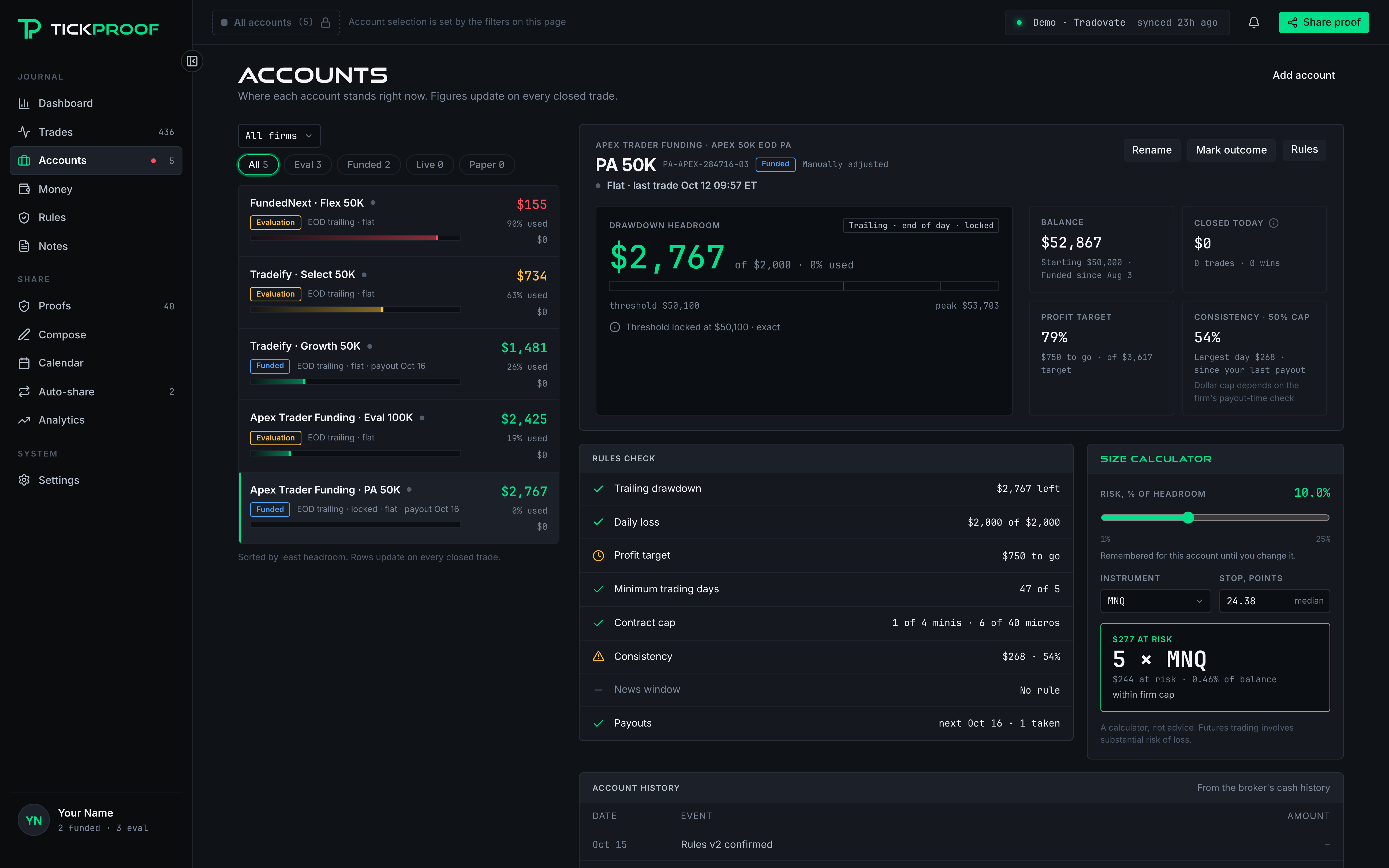
How trades get in: only through the Tradovate connection. You sign in on Tradovate’s own page, TickProof receives a read-only access token, and it never places, changes or cancels an order. There’s no CSV upload and no manual entry, and that’s deliberate: it’s what lets a shared proof stand on broker records.
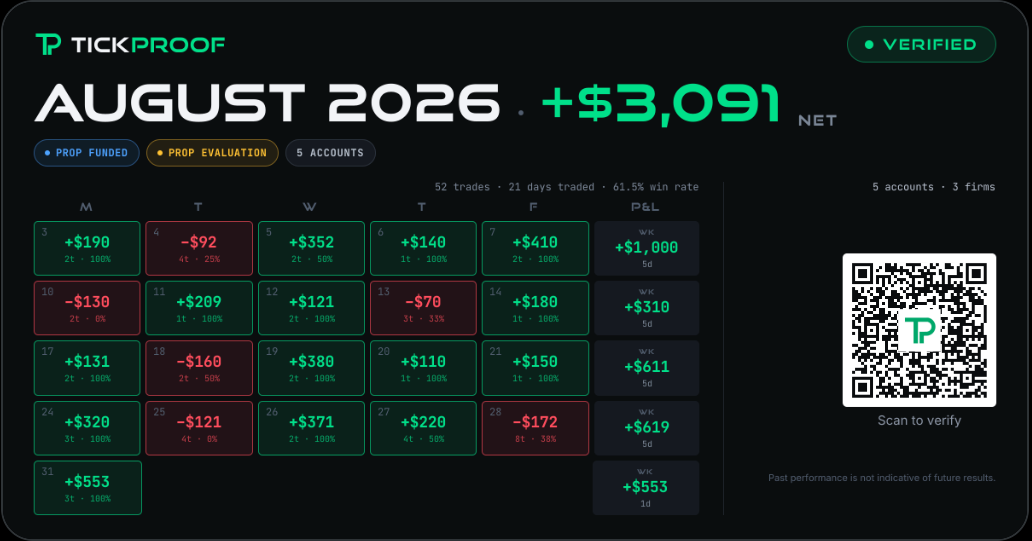
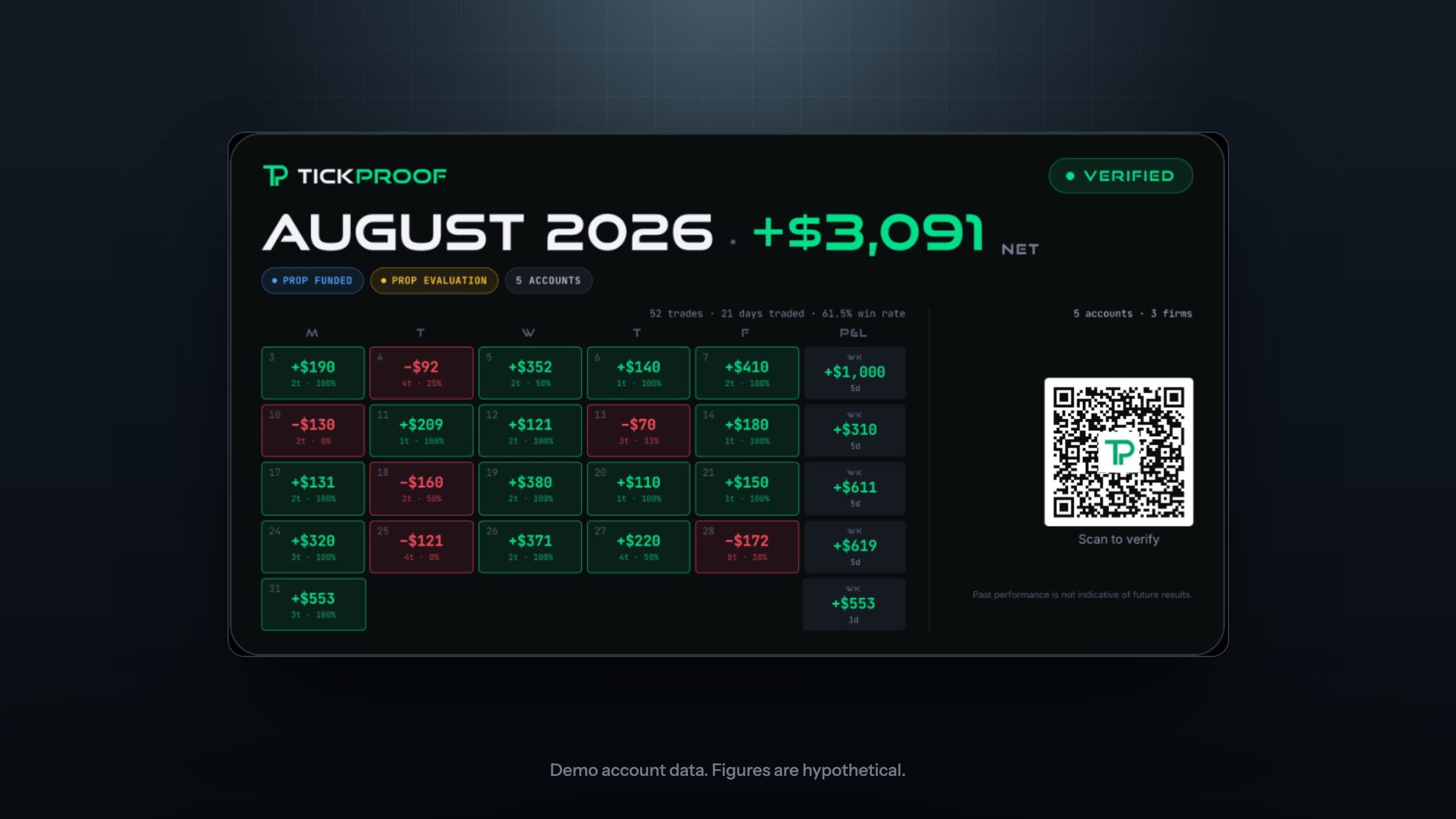
Verified shares: a proof is a fixed snapshot of your broker-synced trades. Its QR code opens a public page with the full trade list for the period, each account’s type (Live, Prop Funded, Prop Evaluation or Paper) and the date TickProof verified it. It can’t be edited after it’s created, but you can revoke it at any time. See a sample verified proof page (it’s a demo, with hypothetical figures).
2. TradesViz TradesViz
Best for: traders who want prop firm compliance tools and connect several platforms.
Price: Pro is $19.99 a month ($14.99 billed yearly) and Platinum $29.99 ($22.49 billed yearly), per its pricing page. The free Basic plan allows 3,000 executions a month on 1 account, but it covers stocks only, so a futures prop trader needs a paid plan.
How trades get in: auto-sync from your broker or CSV files from any platform.
Watch-outs: the free tier doesn’t cover futures, and uploads mean shared results rest on the trader’s word.
3. Tradervue Tradervue: a long-running journal with a small free plan
Best for: traders who want a familiar journal with community sharing and don’t need prop rule tracking.
Price: Basic is free for up to 30 trades a month, and it covers futures. Silver is $29 and Gold $49 a month on its plans page, both with a 7-day free trial.
Prop firm features: none found on its plans page. Gold lists risk tracking and reporting, which isn’t the same as firm-specific rules.
How trades get in: broker import from its supported list, and a generic CSV format for brokers it doesn’t support directly.
Watch-outs: 30 trades a month runs out fast for a scalper. A single busy session on two accounts can use it.
4. TraderSync TraderSync: replay and AI coaching
Best for: traders who want market replay and an AI assistant, and trade more than futures.
Price: list prices are Pro $29.95, Premium $49.95 and Elite $79.95 a month, with a 7-day free trial and no free plan on its pricing page. It usually shows a discount on the first annual plan.
Prop firm features: none found on its pricing page.
How trades get in: its Tradovate page offers a connect button and says its uploader takes CSV files exported from Tradovate.
Watch-outs: trade replay is on Premium and Elite, not Pro, and the AI coach is Elite only.
5. Edgewonk Edgewonk: psychology tools and one plan
Best for: traders who care most about the psychology side of journaling and prefer one yearly payment.
Price: $197 for a year on its pricing page, which also shows an offer at $169. There’s no free plan and no monthly plan listed, and it offers refunds within 14 days of purchase.
Prop firm features: none found. It lists general drawdown analysis, psychology tracking and a “Tiltmeter” for rule-breaking.
How trades get in: Tradovate is in its supported import list, and other platforms can use its Excel import.
Watch-outs: you pay for the year up front.
TradeZella vs TickProof for prop firm traders
| TradeZella | TickProof | |
|---|---|---|
| Free plan | None | Yes, 3 active accounts |
Price for 3 accounts | Pro, $44 to $59 a month | $0 |
| Prop rule tracking | Yes | Yes |
| Trade sources | Auto-sync, file upload, manual | Broker Auto-sync only |
| Verified share with full trade list | No | Yes |
| Backtesting and replay | Yes (replay on Pro and Ultra) | No (coming soon) |
| AI agents | Pro and Ultra | No (coming soon) |
| Platforms | Many (TradeZella says 500+ integrations) | Tradovate (Rhitmic coming soon) |
| X sharing | Basic | Yes, scheduled posts, threads, polls & giveaways |
| Discord sharing | No | Yes (Power plan required) |
TradeZella does more things as it’s not designed specifically for futures traders. Its PropFirm Sync covers the core prop rules and can pick up evaluation fees from a linked bank or card. It has manual and automated backtesting, trade replay with AI insights on Pro and Ultra, AI agents, and a much wider broker list. TickProof does fewer things on purpose as it’s specifically designed for futures and prop firms: it’s built around one kind of account (futures prop accounts on Tradovate) and one promise, that a shared number is verified and backed by broker data.
Who should stay with TradeZella
Stay with TradeZella if any of these describe you:
- You trade stocks or options as well as futures.
- Your prop accounts run on a platform other than Tradovate.
- You rely on CSV imports or manual entries to bring in trades from several places.
How to switch from TradeZella to TickProof
- Join the waitlist with the signup button on this page. TickProof is in private beta, so accounts open from the waitlist.
- Once you’re in, connect Tradovate. You sign in on Tradovate’s page, the same way you’d connect Tradovate to TradingView, and TickProof gets read-only access.
- Pick your firm’s rules for each account, so headroom and the rules check use the right drawdown type and limits.
- Share your first verified proof when you have a period worth sharing.
One thing to know before you cancel anything: your TickProof journal fills from the broker connection, not from a TradeZella export. The first sync pulls each account’s trades from Tradovate back to the day the account was opened, up to 730 days (about two years). Notes, tags and screenshots you keep in TradeZella don’t come across.
Not sure which platform your firm uses? Tradovate keeps a directory of prop firms on its platform.
The bottom line
If you trade futures prop accounts through Tradovate, TickProof gives you a compelling reason to skip the TradeZella subscription. Track each account against its firm’s rules, journal your trades and monitor up to three accounts for free. When you share results, your audience can check the trades behind the numbers. You can also schedule posts, threads, polls and giveaways for X and Discord, keeping your community active while you focus on trading. TickProof brings your account oversight and public track record together, with a free plan you can use every day.
Frequently asked questions
Is TradeZella free?
No free plan is listed on TradeZella's pricing page at the time of writing. Its three plans are Essential at $35 a month, Pro at $59 and Ultra at $99, or $26, $44 and $74 a month billed yearly. Essential connects one active account, Pro up to 50 and Ultra an unlimited number.
What is the best free alternative to TradeZella for prop firm traders?
For futures prop accounts on Tradovate, TickProof is built for this case. Its Free plan covers the journal, prop rule tracking and verified shares for up to three active accounts, with no card. TradesViz and Tradervue also have free plans, but TradesViz's covers stocks only and Tradervue's stops at 30 trades a month.
Why doesn't TickProof allow CSV imports?
Because a file can be edited before it's uploaded. TickProof imports trades only from the broker connection, with no CSV upload and no manual entry. That keeps every shared proof backed by broker records, so anyone viewing it can check the full trade list behind the figures.
Which prop firms does TickProof work with?
Every prop firm that runs its accounts on the Tradovate platform, such as Take Profit Trader, Apex Trader Funding, Tradeify and Lucid Trading accounts on Tradovate. If your prop account runs on a different platform, TickProof can't sync it yet (more connections coming soon).
Can a TickProof results card be faked or edited?
The proof behind it can't be edited. TickProof freezes a snapshot of your broker-synced trades when you create it, and the card's QR code opens a page with the full trade list, each account's type and the date TickProof verified it. An image can be altered, which is why viewers check the linked page.
Keep reading
How to connect Tradovate to TradingView
Connect Tradovate to TradingView in five steps. Prerequisites, prop firm setup, the latency tradeoff, and how to fix the non-tradable symbol error.
Verified trading results: why a journal with no CSV uploads is harder to fake
Broker-synced trades give viewers more to check than a screenshot. How verification works, why TickProof excludes uploads and what verification leaves open.
Take Profit Trader rules explained: drawdown, consistency and payouts
How Take Profit Trader's three drawdowns trail, how the 50% consistency rule works, and when PRO payouts start, with worked numbers for Tradovate traders.